To find a process’s current parent on Mac, read its PPID with ps, or use a hierarchical process view. Start with the child PID you want to investigate:
ps -ww -p 1234 -o pid,ppid,user,commandReplace 1234 with your target. The PPID column is the parent process ID. This helps connect a helper or development server to the process managing it; it does not reconstruct a complete launch history.
Follow the parent in Terminal
If the result shows PPID 567, inspect that process next:
ps -ww -p 567 -o pid,ppid,user,commandBoth PIDs here are examples. Read the command and account for each row before following another level. The selected columns and PID filtering are documented in Apple’s ps reference.
For a snapshot of the wider relationships, list PID and PPID together:
ps -axo pid,ppid,user,commandThis prints a table, not an indented tree. Match a child’s PPID to another row’s PID. A row may disappear between commands if the process exits, so collect the evidence while reproducing the problem.
See the process tree in Activity Monitor
Open Activity Monitor → View → All Processes, Hierarchically. Expand the relevant rows to inspect parent-child relationships. This is a built-in way to explore the tree; you do not need to install another app just for that view. Apple documents it in the process-viewing guide.
Use the process identity and resource readings together. A busy helper under an app is a useful lead, but the hierarchy alone does not identify which browser tab, document, or request created the workload. Check the application’s own task manager or logs for that mapping.
Follow a parent and inspect its context in ProcXray
ProcXray combines the process tree with command-line and environment inspection:
- Switch to tree view and locate the process you are investigating. Clear a restrictive filter if related rows are missing.
- Expand the relevant parent to see its child processes.
- Select a child and inspect Overview. When its parent is available, the parent link selects that process.
- Compare Command Line, executable path, and ENV to understand how the selected process was configured.
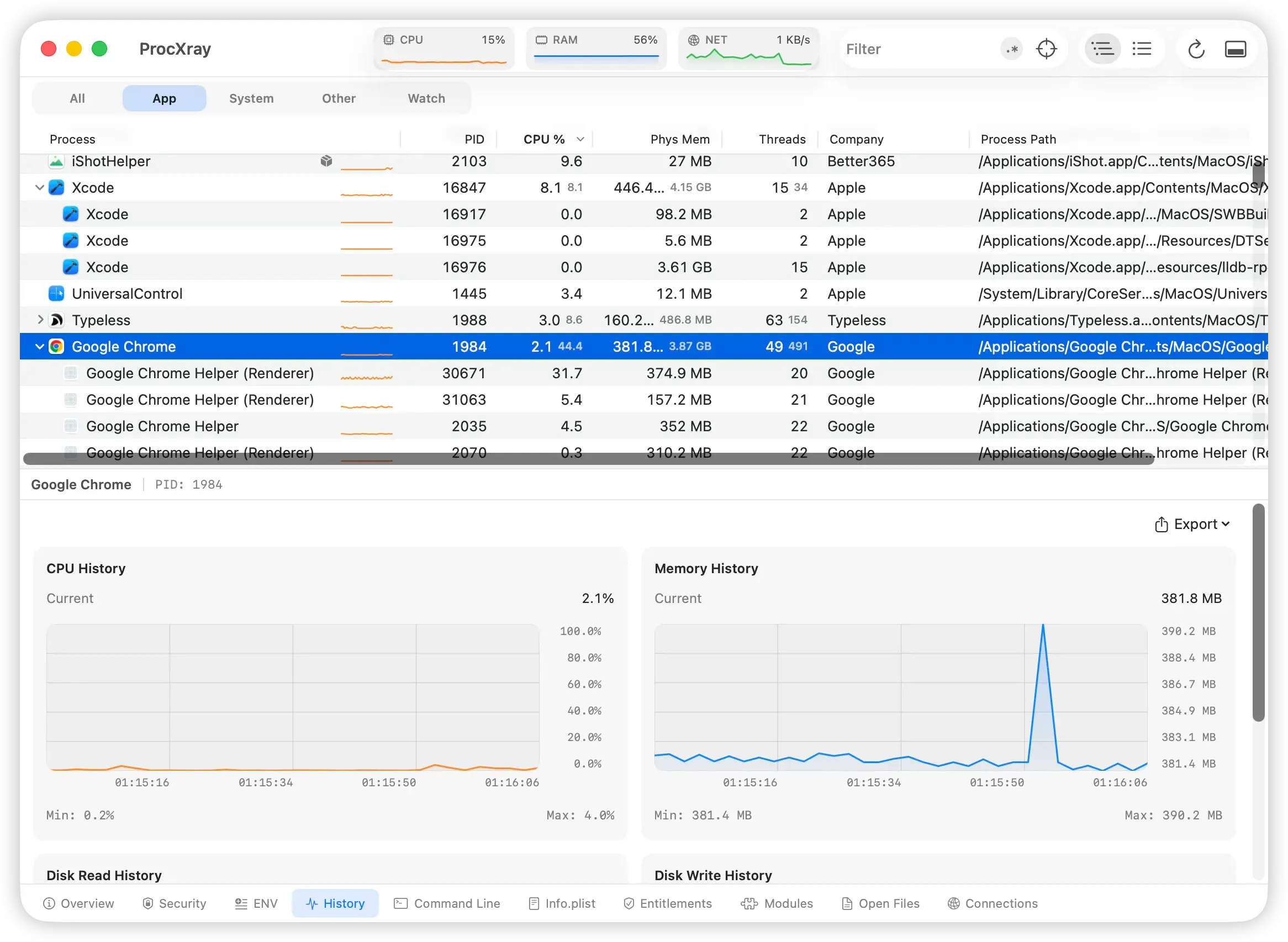
ProcXray places direct children of launchd at the tree’s top level to keep app groups readable. A top-level row therefore does not mean the process has no parent; use Overview or ps to check the PPID.
Investigate a server that keeps returning
Suppose a development server still owns port 3000 after you thought you stopped it. First find the listener’s PID, then inspect its parent and command. The process managing it may be an IDE task, a development watcher, or a service launcher.
Stop or reconfigure the workload through that manager when you identify it. If you terminate only a child that is supervised, the manager may create a new child with a different PID. The new PID does not by itself mean there are multiple independent services.
If the launcher is correct but the behavior differs between runs, compare the launch environment. For future starts and exits, you can configure Watch notifications.
What the tree cannot tell you
Treat PPID and the live tree as current observations. They do not record every earlier parent relationship, the person who clicked an app, or the exact configuration file responsible for a launch. A PPID of 1 is not enough to identify a particular LaunchAgent or LaunchDaemon configuration.
Nor does a process tree capture every short-lived child. ProcXray samples processes and can retain observed exited entries; a process that starts and exits between samples can be missed. If your question requires a sequence of execution events, use the Procmon for Mac tool-selection guide to choose an event capture workflow.
For general process listing rather than parent investigation, see how to check running processes on Mac. The Process Explorer for Mac guide compares broader inspection options.